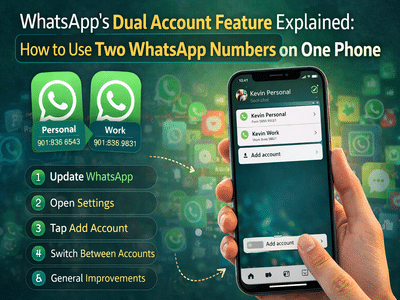
WhatsApp has introduced a long-awaited feature that allows users to run multiple WhatsApp accounts on a single smartphone. This update is designed to make it easier for people who use separate accounts for work and personal communication.
Until now, many users had to carry two phones or repeatedly log out and log back into different accounts to manage multiple WhatsApp numbers. With the new dual account feature, switching between accounts is much simpler and can be done directly inside the app.
The feature was confirmed by Mark Zuckerberg, who announced that WhatsApp users will soon be able to manage more than one account from a single device.
Why the Multiple WhatsApp Account Feature Is UsefulMany professionals, entrepreneurs, and freelancers maintain separate phone numbers for work and personal life. Earlier, this required either using two smartphones or installing third-party apps.
The new WhatsApp feature solves this problem by allowing users to add and switch between two accounts seamlessly within the same app.
This means users can manage conversations, notifications, and settings for both accounts without logging out.
Things You Need Before Setting Up Two WhatsApp AccountsBefore using the dual account feature, there are a few important requirements.
You will need:
- A second phone number
- Either a physical SIM card or an eSIM
- A phone that supports dual SIM or eSIM connectivity
The second number is necessary because WhatsApp sends a one-time verification code via SMS or call during account setup.
Without a second number, the additional account cannot be verified.
Step-by-Step Guide to Use Multiple WhatsApp Accounts on One PhoneSetting up another WhatsApp account on the same device is simple. Follow these steps:
Step 1: Update WhatsAppFirst, ensure that your WhatsApp app is updated to the latest version from the app store.
Step 2: Open WhatsApp SettingsLaunch the app and tap the three-dot menu in the top corner. From there, open the Settings section.
Step 3: Tap the Arrow Next to Your NameInside the settings page, you will see a small arrow icon next to your profile name.
Tap on this arrow to open the account options.
Step 4: Select “Add Account”Choose the “Add account” option to begin setting up the second WhatsApp number.
Step 5: Enter the Second Phone NumberType in your secondary phone number and verify it using the OTP code sent via SMS or voice call.
Step 6: Switch Between AccountsOnce the account is verified, you can easily switch between accounts by tapping the arrow beside your name and selecting the account you want to use.
Separate Settings for Each AccountOne of the advantages of the dual account feature is that each account can have its own privacy and notification settings.
For example, you can:
- Mute chats for one account but not the other
- Customize notification tones separately
- Archive or delete conversations independently
- Block contacts on one account without affecting the other
This ensures both accounts remain completely independent even though they are used on the same device.
Availability of the FeatureWhatsApp has started rolling out the account switching feature in both beta and stable versions of the app.
Currently, the feature is being introduced primarily for Android users. The company has not yet announced an official timeline for when the feature will become available on iPhones (iOS devices).
A Major Convenience for WhatsApp UsersThe ability to run two WhatsApp accounts on a single device is a significant upgrade for users who juggle personal and professional communication.
By eliminating the need for multiple phones or constant logins, WhatsApp is making messaging more convenient and efficient. As the feature continues to roll out globally, more users will soon be able to manage multiple accounts easily from one device.
Contact to : xlf550402@gmail.com
Copyright © boyuanhulian 2020 - 2023. All Right Reserved.