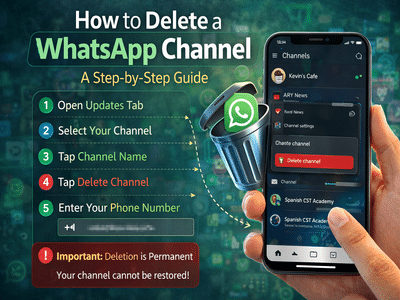
WhatsApp has introduced the Channels feature, allowing users and organisations to share updates with followers through a broadcast-style communication system. Similar to other social platforms, WhatsApp Channels enable administrators to post messages, images, videos, polls, and other updates for their audience.
However, there may be situations where an administrator decides to remove or permanently delete their WhatsApp Channel. Whether the channel is no longer needed or the creator wants to stop publishing updates, WhatsApp provides a simple option to delete it.
Before deleting a channel, it’s important to understand how the feature works and what happens once a channel is removed.
What Is the WhatsApp Channels Feature?WhatsApp Channels act as a one-way broadcasting tool where administrators can send updates to followers. Unlike regular group chats, followers cannot directly reply to messages in a channel.
Administrators can share several types of content through channels, including:
- Text messages
- Photos and videos
- Stickers
- Polls and announcements
WhatsApp is also developing a searchable directory where users can discover channels related to topics such as hobbies, sports teams, news updates, and local organisations.
People can join a channel through invite links shared in chats, emails, or other online platforms.
Important Things to Know Before Deleting a WhatsApp ChannelBefore you proceed with deleting a channel, there are a few important points you should keep in mind.
Deletion Is PermanentOnce you delete a WhatsApp Channel, it cannot be restored. The administrator will no longer be able to post updates from that channel.
Followers Will See a Deletion MessageExisting followers may still see the channel name in their Updates tab, but they will receive a system message stating that the channel has been deleted.
Old Updates May Still Exist on Followers’ PhonesContent previously shared in the channel may remain visible on followers’ devices even after deletion.
New Users Cannot Find the ChannelAfter deletion, new users will no longer be able to discover the channel through search or invitation links.
Channel Links Stop WorkingAny links previously shared to invite people to the channel will stop functioning once the channel is deleted.
How to Delete a WhatsApp ChannelDeleting a WhatsApp Channel only takes a few steps. Follow the guide below to remove your channel permanently.
Step 1: Open WhatsAppLaunch the WhatsApp application on your smartphone.
Step 2: Go to the Updates TabNavigate to the Updates tab on the mobile app. On WhatsApp Web or desktop, open the Channels section.
Step 3: Select Your ChannelFind and tap your channel to open it.
Step 4: Open Channel SettingsTap on the channel name at the top of the screen to access the channel settings.
Step 5: Choose Delete ChannelScroll down and select Delete Channel, then tap Delete again to proceed.
Step 6: Confirm Your Phone NumberTo confirm the action, WhatsApp will ask you to enter your phone number.
Step 7: Complete the DeletionOnce you confirm, the channel will be permanently removed. A message saying “You deleted your channel” will appear in the Updates tab.
Why Someone Might Delete a WhatsApp ChannelThere can be several reasons why administrators choose to remove a channel, such as:
- The channel is no longer active
- The creator wants to stop publishing updates
- The content has moved to another platform
- Privacy or management concerns
Deleting a channel ensures that new followers cannot access it and that the broadcast system is completely shut down.
Final ThoughtsWhatsApp Channels provide a powerful way for individuals, creators, and organisations to share updates with a large audience. But if a channel is no longer required, the platform allows administrators to delete it permanently with a few simple steps.
Before proceeding, administrators should carefully review the consequences, since the action cannot be undone once confirmed.
Contact to : xlf550402@gmail.com
Copyright © boyuanhulian 2020 - 2023. All Right Reserved.