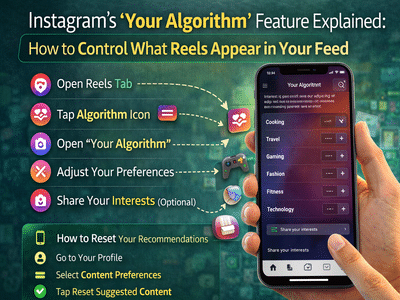
Instagram has introduced a new feature called “Your Algorithm”, giving users more control over the videos that appear in their Reels feed. The update allows people to see which topics Instagram believes they are interested in and adjust those preferences to improve recommendations.
The feature was first launched in the United States in late 2025 and is now gradually rolling out globally in English. With this update, Instagram aims to make its recommendation system more transparent and customizable for users.
What Is Instagram’s “Your Algorithm” Feature?The Your Algorithm tool allows users to view and edit the topics that influence their Reels recommendations. When you open this feature, Instagram displays an AI-generated summary of the subjects it thinks you enjoy.
These topics could include areas such as:
- Cooking
- Travel
- Gaming
- Fashion
- Fitness
- Technology
Users can then tell Instagram whether they want to see more or less content related to these topics, allowing the platform to refine future recommendations.
The feature can be accessed through a new icon displayed in the Reels tab.
How to Adjust Your Instagram Reels AlgorithmIf you want to customize the content shown in your Reels feed, follow these steps:
Step 1: Open the Reels TabLaunch Instagram and tap the Reels icon to start browsing short-form videos.
Step 2: Find the Algorithm IconLook for the icon with two hearts on slider lines in the top-right corner of the screen.
Step 3: Open “Your Algorithm”Tap the icon to open the Your Algorithm panel.
Step 4: View Your InterestsInstagram will display the topics it believes you are interested in based on your activity.
Step 5: Adjust Your PreferencesYou can now type or select topics you want to see more or less of in your Reels feed.
Step 6: Share Your Interests (Optional)Users also have the option to share their algorithm summary on their Instagram Story.
Once preferences are updated, Instagram will gradually adjust your feed to match the selected interests.
How to Reset Instagram Recommendations CompletelyIf you want to start fresh and remove your existing algorithm history, Instagram also offers an option to reset your recommendations.
Here’s how to do it:
After resetting, Instagram clears your recommendation history across:
- Reels
- Explore
- Main feed
The algorithm will then rebuild itself based on your future activity.
Why Instagram Is Offering More Algorithm ControlSocial media companies are facing increasing pressure to provide users with more control over the content they see online, especially for younger audiences.
Instagram’s parent company, Meta, has recently introduced several features aimed at improving transparency and safety on the platform. These include enhanced protections for teen accounts and tools that allow users to filter unwanted content.
Giving users the ability to manage their algorithm is part of this broader effort to make social media feeds more customizable and responsible.
Other Ways to Influence Instagram’s AlgorithmIn addition to the Your Algorithm feature, Instagram already offers several tools that can help users shape their feed.
These include:
- Selecting “Interested” or “Not interested” on posts
- Using the Hidden Words feature to filter unwanted terms
- Switching to the Following Feed, which shows posts only from accounts you follow in chronological order
These options provide additional ways to personalize the Instagram experience.
A Step Toward Greater TransparencyInstagram’s algorithm has often been viewed as a “black box,” with users having limited insight into how content recommendations are generated. The introduction of the Your Algorithm feature offers a new level of transparency by allowing users to see and modify the interests driving their Reels feed.
While the system still relies on user activity and engagement data, this update gives people a clearer way to influence what appears in their daily content stream.
Contact to : xlf550402@gmail.com
Copyright © boyuanhulian 2020 - 2023. All Right Reserved.